
UNCHAINEDWHIPLASH // PC PORT
STATIC RECOMPILATION  //  RELEASE 0.1.1  //  WINDOWS + LINUX

Unchained

Whiplash, the 2003 original Xbox game, rebuilt as a native PC game for Windows and Linux.

The game's own Xbox code is translated ahead of time into a native program, so no emulator runs it. On top sits what a good PC release should have: your screen's full resolution, real widescreen and ultrawide, a HUD at the screen's edges, AMD FSR 1, a Vulkan renderer with no shader stutter on later starts, button prompts for the controller in your hands, an in-game settings menu and a Configuration app that sets it all up from your own copy of the game.

Every file, the release notes and SHA256SUMS.txt are on the releases page. Source code and build steps are on GitHub.

25,805GAME FUNCTIONS RECOMPILED
2SYSTEMS: WINDOWS + LINUX
65%OF THE PC FEATURE LIST DONE
0GAME FILES IN THE DOWNLOAD
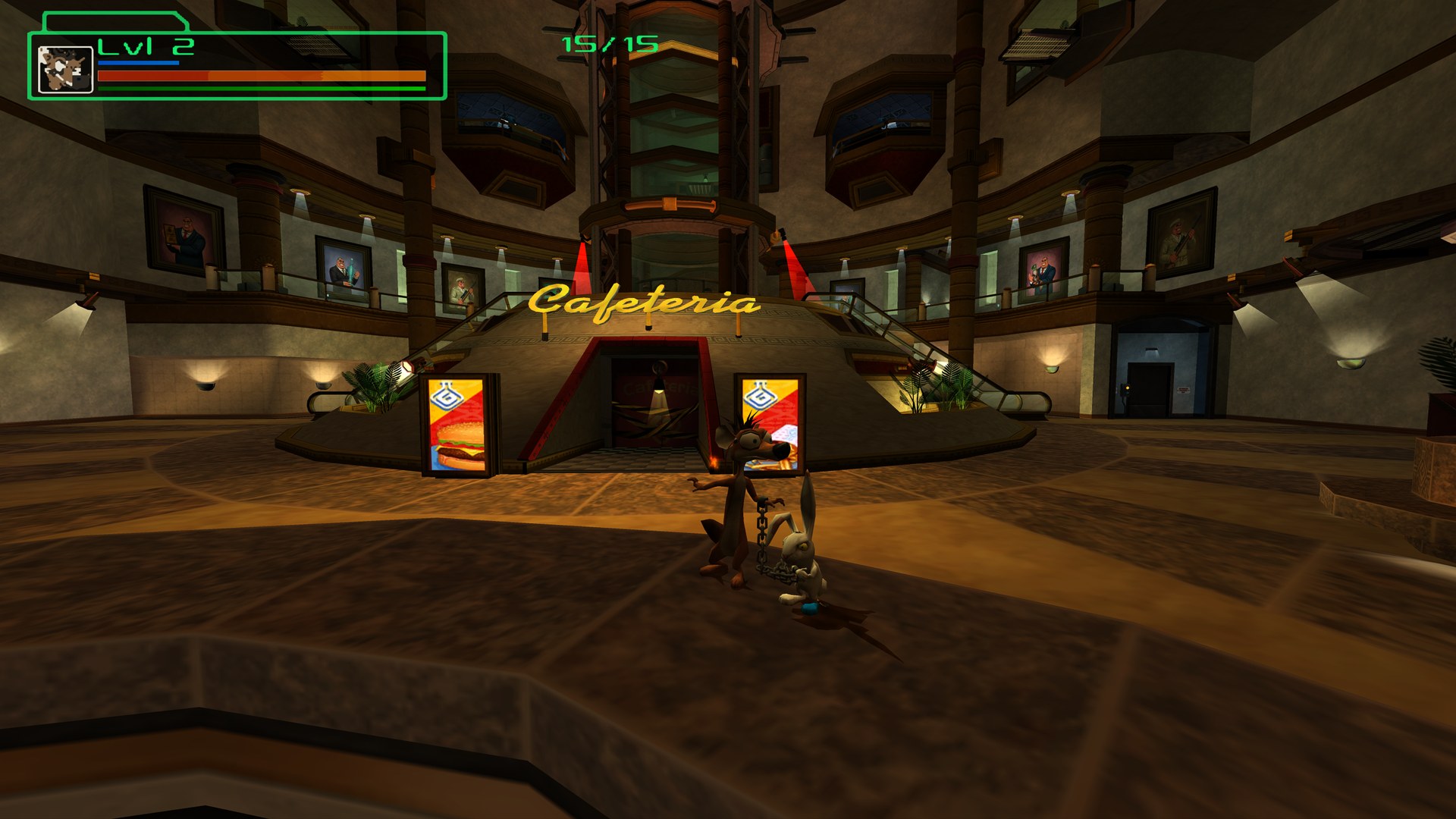
The lobby at 2560x1440 with the wider 16:9 view and the HUD at the screen's top corner
The lobby at 1440p in release 0.1: the game's own view widened to 16:9, the HUD out at the screen's corner.
Bring your own

No game files are included, ever.

You need your own copy of Whiplash for the original Xbox (USA): a disc image made from your disc, or its files copied off it. The game's code is rebuilt on your PC, from your copy, the first time you start it. Please never share or ask for game files in the project's issues.

Made with AI

Written by Claude, directed and played by a human.

Every line of Unchained's code, the tests, the art and this page were written by Claude, Anthropic's AI, through Claude Code. devall96 came up with it, makes the decisions and plays every build, but no human reviews the code line by line. You run it at your own risk.

Early: 0.1

The opening levels play. The rest is unexplored.

The training lab and the lobby around it have been played through on Windows and Linux, on one PC. Later levels haven't been played on Unchained yet. Saves are backed up at every start, but keep a copy of any you care about.

Not official

A fan project.

Not made by, affiliated with or endorsed by Crystal Dynamics, Eidos, Square Enix, Embracer Group or Microsoft, or by the authors of the recompiler it's built on. Problems go to Unchained's issues.

Testers wanted

ONE PC SO FAR. YOURS WOULD MAKE TWO.

Everything so far has run on exactly one computer: an AMD Ryzen 7 7800X3D with a Radeon RX 9070 XT, on Windows 11 and Ubuntu 26.04. That says very little about how Unchained does on yours. If you own the game and have an evening, a report, even "it worked fine", would help a great deal.

Never tested on
  • NVIDIA graphics, any generation, and Intel Arc or integrated graphics. The Vulkan renderer has only met AMD's drivers.
  • Steam Deck and other PC handhelds (ROG Ally, Legion Go). It should work; nobody has tried.
  • Laptops, older or slower PCs, and Linux distros and desktops beyond Ubuntu.
  • Controllers other than an Xbox pad: DualSense, DualShock 4, Switch Pro, 8BitDo, generic pads.
  • Ultrawide (21:9, 32:9) and 16:10 screens, high refresh rates, G-Sync and FreeSync, several monitors.
How to help
  1. Download the installer or the AppImage above and set it up with your copy of the game.
  2. Play a level, ideally one past the first few, and note anything that looks, sounds or plays wrong.
  3. Open a bug report with your system, GPU and driver, where it happened, a screenshot (F12) and the newest log from the logs folder. The form walks you through it.

Can you code? Contributions are very welcome too, on the test branch. A bit of help goes a long way.

What it does

THE CONSOLE GAME, FAITHFULLY, PLUS A REAL PC RELEASE AROUND IT.

The game, natively
  • The whole Xbox game as native code: 25,805 functions, rebuilt on your PC from your copy at the first start, in about 10 to 40 seconds with the bundled compiler.
  • No emulator. The console's system is stood in for by a runtime made for it, and the game's graphics go straight to Vulkan.
  • Saves on a virtual Xbox hard disk, like the console's, backed up every start.
  • One supported release, checked at setup, so you never chase a bug from a different disc.
Picture
  • Your screen's resolution, and supersampling past 100%.
  • Real widescreen and ultrawide, 16:9 up to 32:9: the game's own camera is widened, so you see more instead of a stretch, with nothing popping in at the edges.
  • AMD FSR 1 upscaling with sharpening, 16x texture filtering, shadows at 2048 instead of 256, field of view and draw distance.
  • Clean menu and HUD edges: text, frames and the terminal icons redrawn at 4x.
  • Colour grading and presets, including OG Graphics: the console as it was, 640x480 at 4:3.
HUD and prompts
  • The HUD at the screen's edges, like a modern game, at any aspect, with menus kept centred. A slider moves it back to where the console had it.
  • Button prompts for the controller in your hands, switching live: today's Xbox pad, PlayStation symbols or Nintendo letters, or the console's own glyphs.
Smoothness
  • Vulkan by default on both systems, Direct3D 12 as the fallback on Windows. In frame-time tests Vulkan's lows matched or beat D3D12's everywhere.
  • No shader stutter after the first start: shaders are kept, and every graphics pipeline is made ahead in the background.
  • VSync modes: off, on, adaptive, fast and VRR for G-Sync and FreeSync.
  • Performance overlay (F10): frame times, 1% and 0.1% lows, hitches.
Menus and setup
  • In-game menu (F1, or Back + Start) with every option the Configuration app has, applied as you play.
  • Configuration app in a lab-terminal look of its own: pick your disc image or folder, it checks and copies, builds the code with its progress on screen, then PLAY.
  • The same windows and fonts on Windows and Linux.
Controls, saves, extras
  • Any controller through SDL3, by button position, with camera speed, inversion and vibration strength.
  • Save backups (last 5), save profiles and a movable data folder.
  • Screenshots (F12), colour vision filters and a HUD-off switch.
  • Texture packs: dump, edit or upscale, and your images are drawn instead.

Screenshots

RELEASE 0.1, 2560x1440, CAPTURED FROM THE RENDERER.

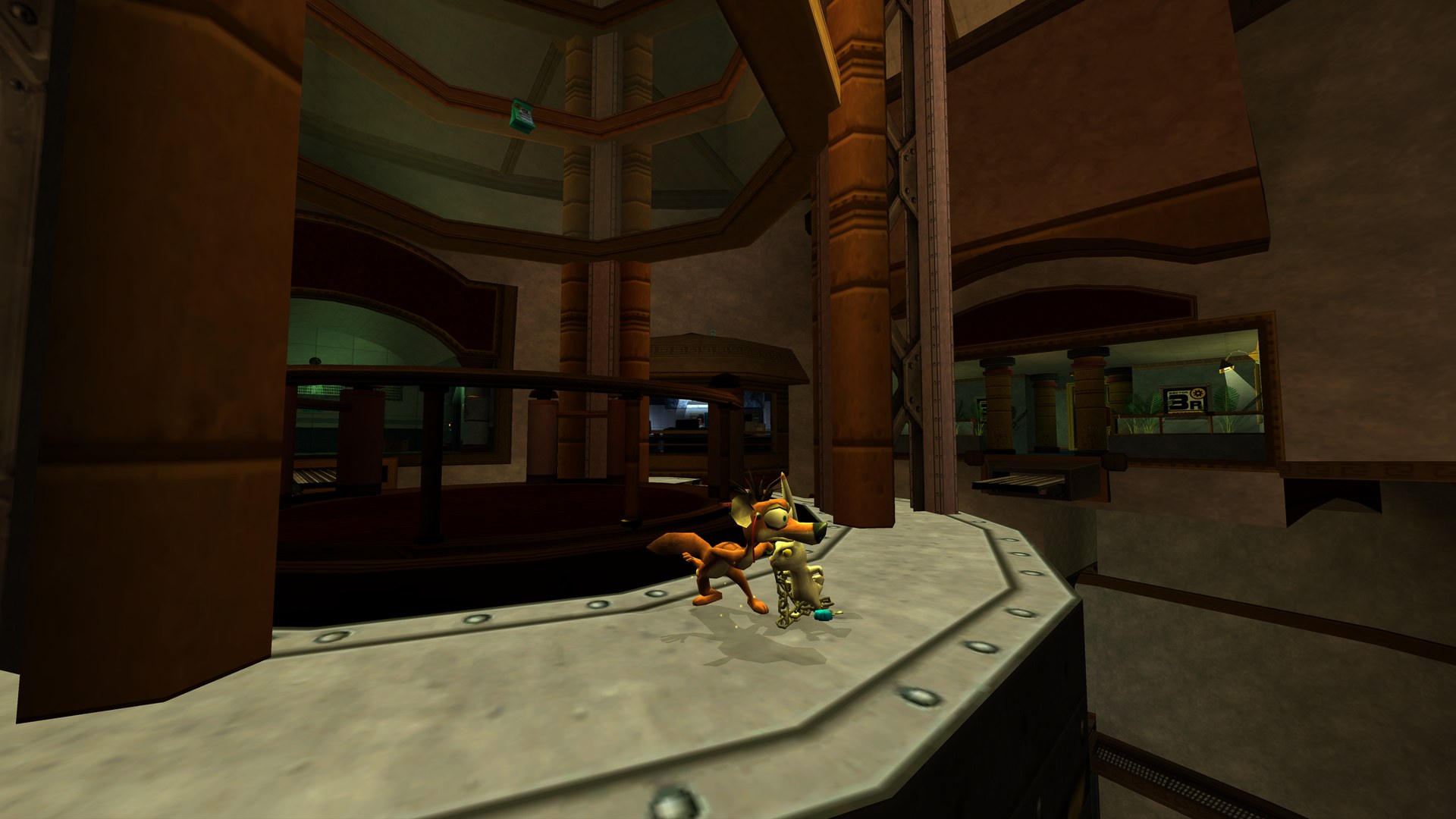
On a walkway above the lobby, the floors below drawn at 1440p
Above the lobby: every floor below drawn sharp at 1440p, with high-resolution shadows and 16x texture filtering.
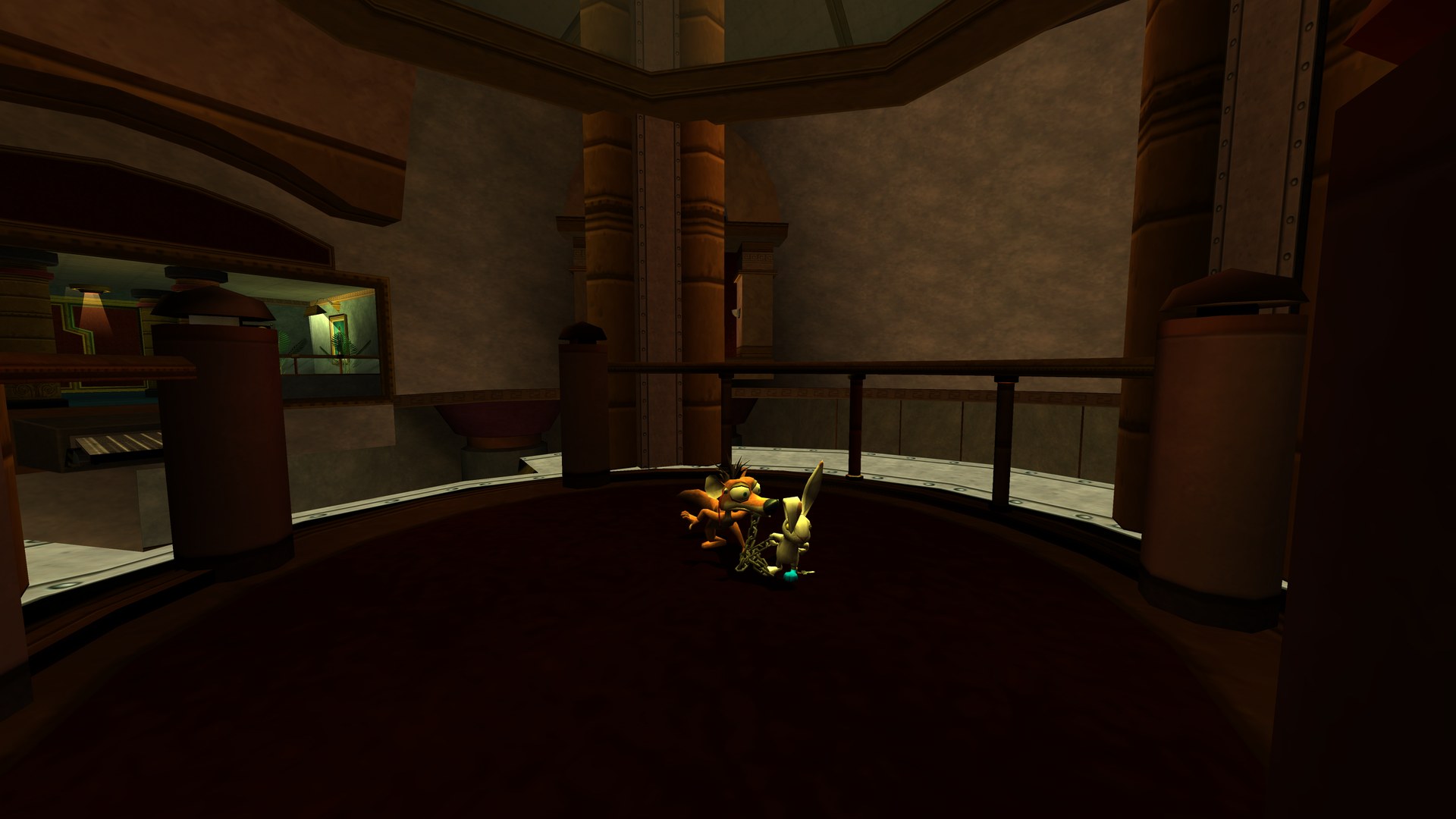
A dim balcony in the lobby, lit the way the original Xbox version lights it
A balcony, lit as the original Xbox version lights it: dim, with the lamps doing the work.

The game graphics in these screenshots come from a legally obtained copy of the game, as they do on your PC. They belong to their owners and aren't part of Unchained.

The Configuration app

CAPTURED FROM THE 0.1 RELEASE ON A FRESH INSTALL, BEFORE ANY GAME FILES WERE ADDED.

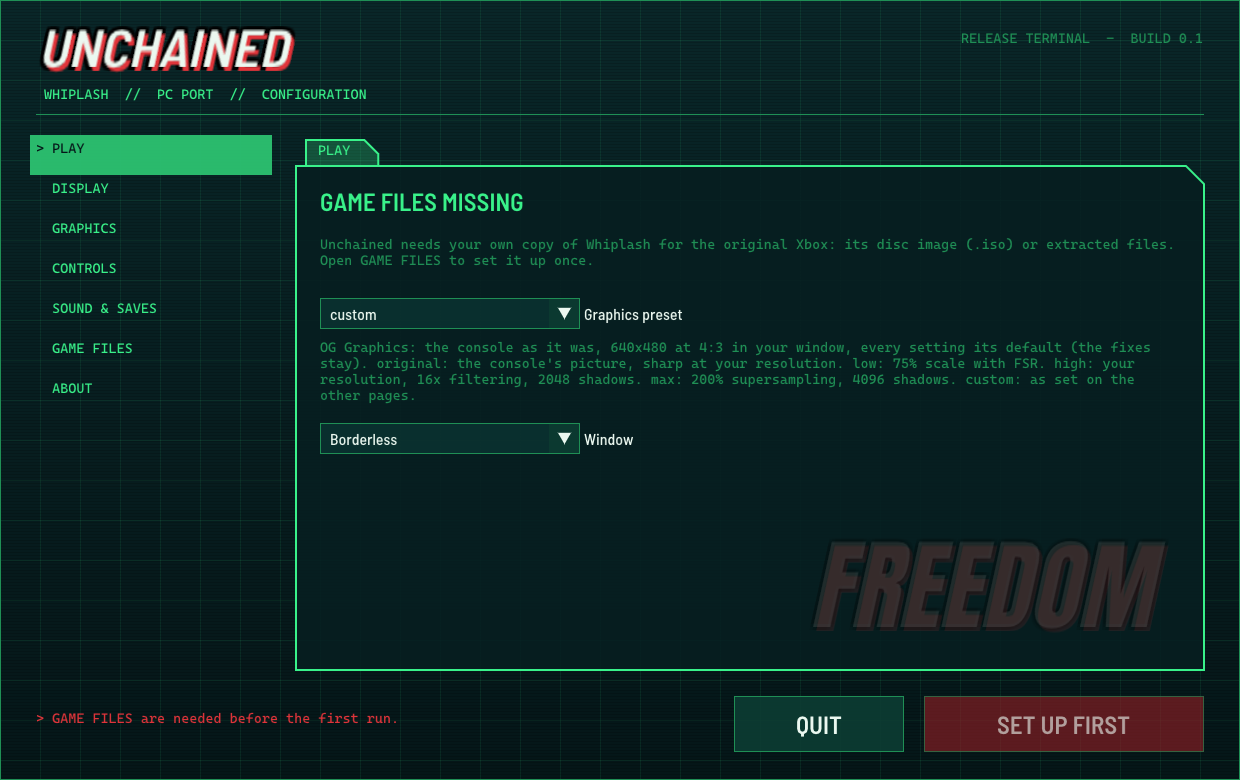
The Unchained Configuration app
PLAY: the graphics preset (OG Graphics, Original, Low, High, Max or your own) and the window mode. Before setup it points you to GAME FILES.

Where it's at

STARTED SUN 15 NOV 2026. PLAYABLE OPENING TWO DAYS LATER.

Progress against the PC feature list (started items count half). The full list, item by item with its evidence, is docs/TODO.md.

Core75% · 3/4
Platforms and input67% · 4/6
Performance75% · 6/8
Graphics92% · 5.5/6
Player features58% · 7/12
Adapted to Whiplash36% · 4/11
Launcher, files and theme88% · 3.5/4
ALL65% · 33/51
Status board
PartStatus
Boots, menus, savesWorks
Opening levels (training lab, lobby)Played through on Windows and Linux
The rest of the gameNot played on Unchained yet. Help wanted.
Music and sound effectsWork
Spoken dialogueSome of the partner character's lines don't play yet
Windows, Vulkan with D3D12 fallbackTested on one AMD PC
Linux AppImageTested on Ubuntu 26.04; reaches the title on Ubuntu 24.04, Fedora and Arch
Steam DeckShould work, untested
macOSOn the roadmap

What doesn't work yet is listed under Known issues.

Known issues

WHAT RELEASE 0.1 DOESN'T GET RIGHT YET.

Release 0.1
  • Spoken dialogue: many of the partner character's lines don't play yet. The main character's voice, the sound effects and the music do. The first sure example is the fire machine scene in the training lab.
  • Light beams flicker: the beams the lab's wall lamps throw straight up vanish and come back at some distances. What's known so far is in LIGHT_BEAM_FLICKER.md, for anyone who wants to pick it up.
  • Hyper mode works, but its trail effect doesn't show yet.
  • Only the opening levels have been played through. Later levels are untested.
  • Controller only for now. Keyboard and mouse play is on the roadmap.
  • Above 60 fps is only checked in the intro and menus, so the cap stays at 60 by default.
  • Draw distance doesn't reach the gameplay camera in the wide view yet (it does at 4:3).
  • The title screen in widescreen shows a white strip at each side, past the edge of its sky.
  • The very first start compiles shaders as it goes, so the first loading-screen cuts hitch once. From the second start they're gone.
  • Some rooms are darker and greener than you may remember. That's the original Xbox version's own lighting; the PS2 version lights characters more brightly. An optional brighter look is on the roadmap.
  • Not code-signed yet, so Windows SmartScreen warns on the first run.

Found something else? Please report it.

Getting started

ABOUT 5 GB FREE, YOUR COPY OF THE GAME, A CONTROLLER.

Windows

Windows 10 or 11, 64-bit
A GPU with Vulkan 1.3 or Direct3D 12
Nothing else to install

  1. Run the installer. It installs for your user only, to C:\Unchained by default. Or extract the zip to any folder you can write to (not Program Files).
  2. If SmartScreen warns ("Windows protected your PC"), choose More info, then Run anyway. Unchained isn't code-signed yet.
  3. On GAME FILES, choose your disc image or game folder. It checks, copies and builds the game's code once.
  4. Press PLAY. From then on, Unchained starts straight into the game.
Linux

A 64-bit distro from 2022 on (Ubuntu 22.04, Debian 12, Fedora 36, SteamOS 3 or newer)
A Vulkan 1.3 driver (Mesa, or NVIDIA's own)
The compiler is inside the AppImage

  1. Make the AppImage executable: right-click, Properties, allow executing, or chmod +x Unchained-0.1.1-Linux-x86_64.AppImage.
  2. Run it. It adds Unchained and Unchained Configuration to your applications menu.
  3. Choose your game files and press PLAY, as on Windows.

No FUSE on your system? Run it with APPIMAGE_EXTRACT_AND_RUN=1. Without a Vulkan driver, Unchained tells you which to install. Your data lives in ~/.local/share/Unchained.

Steam Deck

It should run, but nobody has tried yet. SteamOS 3 is newer than the AppImage needs, the Deck's GPU has a Vulkan 1.3 driver and its controls appear as a controller.

  1. In Desktop Mode, make the AppImage executable and run it once to set up your game files.
  2. For Game Mode, add it in Steam with Add a Non-Steam Game, then start it from your library.
  3. If it runs heavy, try the Low preset or a lower render scale with FSR 1.

Please report how it goes. A handheld preset and an Add to Steam button are on the roadmap.

Which copy works
  • One version: Whiplash for the original Xbox, North American (USA) release. Other regions aren't supported yet.
  • A disc image or a folder with the files copied off your disc both work.
  • Use an untouched copy. Some tools that shrink disc images change a small part of the game's main file. Unchained notices and asks for an unchanged copy.
  • It checks for you when you pick your files, before anything is copied. No keys, BIOS or console files are needed. The game is English only, as the disc is.
Shortcuts
KeyControllerWhat it does
F1Back + StartThe in-game menu, with every setting
F10The performance overlay
F12A screenshot, saved as a PNG

Roadmap

ROUGHLY IN ORDER. TRACKED ITEM BY ITEM ON GITHUB.

Next
FINISHING THE GAME
  • A full playthrough, level by level, fixing whatever breaks. Testers help most here.
  • Every voice line playing, the partner character's included.
  • Hyper mode's trail and the lamp light beams.
  • The camera's feel, checked against the console.
  • Above 60 fps in gameplay, then a higher default cap.
  • Draw distance in the wide view.
Then
MORE PC FEATURES
  • Steam Deck and handhelds: a handheld preset and an Add to Steam button.
  • One-click updates from the Configuration app.
  • Keyboard and mouse: rebindable keys, a mouse camera, key caps in the prompts.
  • HDR10, colour LUTs and a photo mode with a free camera.
  • An optional brighter, PS2-style character lighting.
  • Assists (invincibility, damage scaling, text speed), level select, effect toggles.
  • Translated menus and Discord Rich Presence (off by default).
  • A faster release build; later, modern upscalers and frame generation.
macOS port
PLANNED
  • Graphics: the Vulkan renderer on Apple's Metal through MoltenVK.
  • Window, input and sound already go through SDL3, as on Linux.
  • The game's code is portable C++, so a native Apple Silicon build looks possible, with Rosetta 2 as the fallback.
  • Still to do: the Xbox memory mapping, the first-start build on macOS, the Configuration app, a signed and notarised app.
Giving back
ONGOING
  • The runtime work goes upstream: the push buffer interpreter, the rendering fixes and the Vulkan renderer, so other Xbox games written the same way can run.
  • Decompilation over time: the game's own systems rewritten as readable C++, one at a time.

How it was made

FROM THE RECOMPILER'S TEMPLATE TO A RELEASE.

A search found no port, decompilation or tools for Whiplash anywhere. The original Xbox release was the way in: its x86 code can be recompiled with the Xbox XBE Recomp toolkit. The game turned out to be unusual, so much of the work went into the runtime itself.

SUN 15 NOV · 04:13

The template

The project starts from the recompiler's game template: 25,805 functions turned into C++. About 140 library functions the signatures missed are named by hand, one boot at a time.

SUN · 16:47

The name

Unchained: a play on the chain, and on freeing the game from the Xbox.

SUN · 17:41

First frames, and the strobe

Seventeen boots later the game presents frames. It asked for two presents a frame, so the screen flashed between colour and black; fixed so only real frames show.

SUN · 19:03

A push buffer interpreter

Whiplash mostly skips Direct3D and writes the Xbox GPU's raw commands itself, which no version of the runtime could run. An interpreter for them brought up the intro, then the title.

SUN · 19:35 – 19:53

Controls, saves, characters

Input reaches the game, the console's disc check passes so the hard disk and saves work, and the characters appear whole.

MON 16 NOV · NIGHT

Rendering fixes

Shadows into their own texture, the cutscene letterbox, hyper mode's texture stages, culling, frame buffer addresses, and a sweep for anything left unmapped.

MON · MORNING

The PC port

Full resolution and real widescreen, FSR 1, the frame-time test suite, VSync modes, the shader cache, the HUD at the edges, presets, accessibility, the overlay, the Configuration app and setup, button prompts and clean UI edges.

MON · EVENING

Ready to share

The in-game menu, the single-exe installer and a themed build window that goes straight into the game.

TUE 17 NOV

Linux and Vulkan

The widescreen pop-in fixed, then the Linux port: a native Vulkan renderer for both systems, one AppImage, every window the same on Windows and Linux, Vulkan as the default, OG Graphics, and release 0.1.

How it's tested

Every build is played on screen. Frames are captured from the renderer itself and compared with footage of the original. Performance is measured frame by frame (1% and 0.1% lows, hitches, stutter, pacing), never by an average fps. An automated suite replays scripted and recorded play sessions on both systems and both renderers.

The bar for features comes from the projects devall96 contributes to: what a good PC recomp release should have, applied to an original Xbox game from 2003.

FAQ

THE QUESTIONS MOST LIKELY TO COME UP.

Is the game included?

No, and it never will be. Unchained contains no game files or code. You need your own copy of the original Xbox Whiplash (USA). The game's code is built on your PC from your copy.

Is this an emulator?

No. The game's Xbox code is translated ahead of time into native code for your PC. A runtime stands in for the console's system, sound and graphics, but nothing interprets the game's code while you play.

Why does the first start take a while?

That's the game's code being built for your PC, once, with the compiler that comes with Unchained (about 10 to 40 seconds). Later starts go straight into the game. The first time each scene is drawn its shaders are made too; from the second start they're kept.

Some rooms look darker and greener than I remember.

That's the original Xbox version's own lighting: the levels ask for it, and Xbox footage shows the same. The PS2 version lights characters more brightly, which is where the brighter memory usually comes from. An optional brighter look is on the roadmap.

Can I play with keyboard and mouse?

Not yet. Release 0.1 is played with a controller; full keyboard and mouse play is on the roadmap.

Where are my saves?

On a virtual Xbox hard disk in Unchained's data folder (beside the program on Windows, ~/.local/share/Unchained on Linux). Each start copies them to save backups first and keeps the last five.

Does it go online?

No. Unchained has no accounts, no telemetry and no update checks.

Something broke. What do you need?

A bug report with your system and GPU, where it happened, a screenshot (F12) and the newest log from the logs folder. For a crash, also the newest file in CrashDumps.